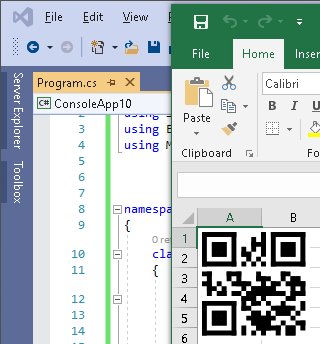
Creating Barcode in Excel from C#
Here we show how to run Excel from a C# console application, how to create a barcode with Class-based version of StrokeScribe barcode generator and place the barcode into a workbook. The barcodes in Excel are stored as vector-based WMF pictures.
How to Proceed
- Download and install the barcode generator;
- Create a C# console application.
- Paste the following code into the project.
Creating a C# Barcode App
1. In Visual Studio, create a console application.
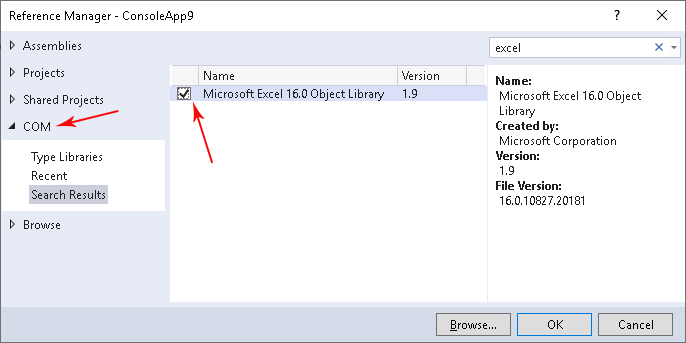
2. Execute Project->Add Reference and add a reference to Excel Object Library into the project:
3. Add a reference to StrokeScribe Class into the project:

4. Copy the following code into the project, build and run the application:
using System.IO;
using STROKESCRIBECLSLib;
using Excel = Microsoft.Office.Interop.Excel;
using Microsoft.Office.Core;

namespace ConsoleApplication1
{
    class Program
    {
        static void Main(string[] args)
        {
            StrokeScribeClass barcode = new StrokeScribeClass();

            barcode.Alphabet = enumAlphabet.CODE128;  // or enumAlphabet.QRCODE or enumAlphabet.DATAMATRIX
            barcode.Text = "1234ABCDE";

            string pth = Path.GetTempPath() + "barcode.wmf";  // Creating a temporry barcode picture

            int width = barcode.BitmapW;
            int rc = barcode.SavePicture(pth, enumFormats.WMF, 1440, 1440);   // 1440 TWIPs = 1 inch
            if (rc != 0)
                System.Console.Write(barcode.ErrorDescription);

            Excel.Application x = new Excel.Application(); // Starting Excel
            x.Visible = true;
            x.Workbooks.Add();
            Excel.Worksheet wsh = x.ActiveSheet;

            Excel.Shape sh = wsh.Shapes.AddPicture(pth, MsoTriState.msoFalse, MsoTriState.msoTrue,
                0, 0, (float)x.CentimetersToPoints(3), (float)x.CentimetersToPoints(3));

            File.Delete(pth); // Removing the temporary picture
        }
    }
}
5. Switch to the Excel window and enjoy the barcode:

Related Tutorials


© 2026 StrokeScribe. All rights reserved. Use of any portion of this site constitutes acceptance of our Terms of Use and Privacy Policy. The website material may not be reproduced, except with the prior written permission.