
Barcode in ASP.NET (C#)
An example of creating barcodes in ASP.NET using C# script and COM class-based version of StrokeScribe barcode generator. The barcodes shown here are GIF images.
How to Proceed
- Download and install the barcode generator on your IIS machine;
- Create an .aspx file in the website folder;
- Paste the following C# code into the .aspx file;
- Open the page in a browser.
A Code Example
This code creates a GIF image of a barcode in memory and sends the image to a browser.
<%@ Page Language="C#"  Debug="true" %>
<%
Type StrokeScribeClass = Type.GetTypeFromProgID("STROKESCRIBE.StrokeScribeClass.1");
dynamic barcode = Activator.CreateInstance(StrokeScribeClass);

barcode.Alphabet = 25;  //25=QRCODE
barcode.Text = "ABC1234";  //Any data to encode in the barcode

int w = barcode.BitmapW;   //The barcode width in pixels
int h = barcode.BitmapH;

byte[] buf = barcode.GetPictureArray(1, w*5, h*5); //1=GIF, 5x5 pixel barcode modules

if (barcode.Error>0)
{
  Response.Write(barcode.ErrorDescription);
  return;
}

Response.Clear();
Response.ClearHeaders();

Response.ContentType = "image/GIF";
Response.AddHeader("Content-Disposition", "attachment; filename=barcode.gif"); //Sending the barcode's GIF image to the browser

Response.BinaryWrite(buf);
%>
The BitmapW/BitmapH properties show the minimum picture size that fits the barcode.
For square barcodes (QR Code, Data Matrix), specify the same value for width and height: GetPictureArray(1, w, w) or GetPictureArray(1, h, h).
For linear barcodes (CODE-128, EAN-13), you need to use the value received from BitmapW (and it's multiplies) for the picture width and absolutely any value for height: GetPictureArray(1, barcode.BitmapW*3, 100).
Code Snippets
All Barcode Types
How to Encode a Byte Array
barcode.Alphabet = 25; // 25=QR CODE
barcode.CodePage = -1; // no code page conversion
byte[] data = {1,2,3,4,5};
barcode.Text = data;
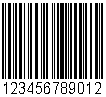
CODE 128
To create a Code 128, modify your code in the following way:
barcode.Alphabet = 5; // 5=CODE128
int w = barcode.BitmapW;
byte[] buf = barcode.GetPictureArray(1, w*2, w);
How to Specify an Alternative Text Below the Barcode
barcode.TextBelow = "Hello";
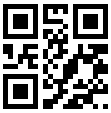
QR Code
To create a QR Code, modify your code in the following way:
barcode.Alphabet = 25; // 25=QR CODE
barcode.Text = "ABCDEF";
Mobile-friendly Barcodes
Use UTF-8 encoding to make barcodes with national characters readable by mobile barcode readers.
barcode.Alphabet = 25; // 25=QR CODE
barcode.CodePage = 65001; // 65001 = UTF-8
barcode.Text = "ΞΟΠΡΣΤΥΦ";
How to Modify the Error Correction Level
barcode.Alphabet = 25; // 25=QR CODE
barcode.QrECL = 0; // 0 = weakest error correction
How to Force the Minimum Matrix Size
barcode.Alphabet = 25; // 25=QR CODE
barcode.QrMinVersion = 10; // 57x57 modules QR CODE matrix

PDF417
To create a PDF417 barcode, modify your code in the following way:
barcode.Alphabet = 6;   // 6 = PDF-417
barcode.Text = "123ABC";
int w = barcode.BitmapW;
int h = barcode.BitmapH;
byte[] buf = barcode.GetPictureArray(1, w, h);
To create a Compact PDF417:
barcode.Alphabet = 6;
barcode.CompactPDF417 = true;
How to Set the Non-default Error Correction Level
barcode.Alphabet = 6;
barcode.PDF417ErrLevel = 8;
How to Fix the Number of Rows or Columns
barcode.Alphabet = 6;
barcode.PDF417Cols = 3;
barcode.PDF417Rows = 7;

DATA MATRIX
To create a Data Matrix barcode, modify your code in the following way:
barcode.Alphabet = 8;  // 8 = DATA MATRIX
barcode.Text = "ABC123DEF";
How to Force the Minimum Matrix Size
barcode.DataMatrixMinSize = 132;
How to Modify the Quiet Zone Size
barcode.QuietZone2D = 0;

AZTEC
To create an Aztec barcode, modify your code in the following way:
barcode.Alphabet = 33; // 33 = AZTEC
barcode.Text = "ABC123";
How to Force the Minimum Matrix Size
barcode.AztecMinLayers = 132;
How to Set the Desired Error Correction Level
barcode.AztecECL = 50;
How to Modify the Quiet Zone Size
barcode.QuietZone2D = 0;


© 2026 StrokeScribe. All rights reserved. Use of any portion of this site constitutes acceptance of our Terms of Use and Privacy Policy. The website material may not be reproduced, except with the prior written permission.