Drawing Barcode in Siemens NX
This example shows how to draw a barcode in sketch mode using SNAP API. If you are looking for an alternative solution, look in the related tutorials.
How to Proceed
- Download and install the barcode generator;
- Create an empty model file in NX;
- Create a sketch;
- Run the VB script.
How it Works
Here is how a typical Data Matrix barcode looks like:

This is an output of the ZebraBits property that represents a barcode picture as a string of ones and zeros:
101010101010
101001111111
101101110100
100100000111
111110110100
100111001001
110111011100
110110000111
100110001100
111010110101
110111000010
111111111111
Each "1" represents a black module, "0" represents a white module.
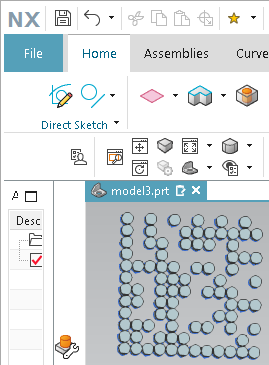
And here is how the "zebra" pattern can be translated to a sketch in NX:

The VB script shown below converts the zebra pattern to an array of cirle primitives. Each "1" becomes a circle and we don't draw anything for zeros so the barcode will look transparent.
Preparing the VBA Project in NX
1. Press Alt+F11 to open the Journal Editor.
2. Paste the following code into the editor.
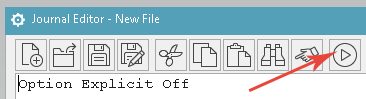
3. Click the Play button to run the code.:
The Code Example
Option Explicit Off

Imports Snap, Snap.Create, NXOpen

Module BarcodeSample
  Sub Main ()
    const QRCODE = 25
    const DATAMATRIX = 8

    dim ss = CreateObject("STROKESCRIBE.StrokeScribeClass.1")

    ss.Alphabet = DATAMATRIX
    ss.Text = "ABCD" ' Any text to encode in the barcode. (Do not specify a long text in demo version!)

    dim zebra = ss.ZebraBits
    if(ss.Error > 0) then
      InfoWindow.WriteLine(ss.ErrorDescription)
      exit sub
    End If

    draw_barcode (zebra, 20, 20, 0.5) 'X, Y, radius
  End Sub

  Sub draw_barcode(zebra As String, startx as Double, starty as Double, radius as Double)
    Dim ssn As Session = Session.GetSession()
    Dim sk As Sketch = ssn.ActiveSketch
    Dim x As Double
    Dim y As Double
    x = startx
    y = starty
    i = 1
    Do
       z = Mid(zebra, i, 1)
       Select Case z
       Case ""
          Exit Do
       Case "0"
          x = x + radius*2
       Case "1"
          Dim a As NX.Arc
          a = Circle(x, y, radius - 0.01) ' Subtracting a small value from the radius to avoid self-intersecting body when extruding the barcode
          If not IsNothing(sk) Then  ' If we are in a sketch editing mode, adding the circle into the sketch
            sk.AddGeometry(a.NXOpenArc, Sketch.InferConstraintsOption.InferNoConstraints)
          End If
          x = x + radius*2
       Case Chr(10)
          x = startx
          y = y - radius*2
       End Select
       i = i + 1
    Loop
  End Sub
End Module
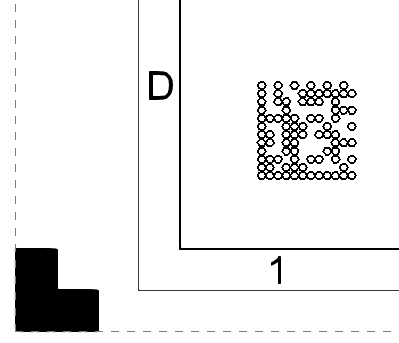
The code is tested to work with modeling, drawing and layout templates. You may want to adjust the start X/Y coordinates when running the code on a drawing template:
draw_barcode (zebra, 30, 30, 0.5)
Drawing Linear Barcodes in Siemens NX
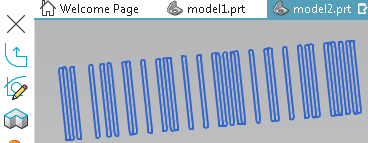
The code is modified to draw linear barcodes:
Option Explicit Off

Imports Snap, Snap.Create

Module BarcodeSample
  Sub Main ()
    const CODE128 = 5
    const EAN13 = 3
    const I2OF5 = 4
    const CODE93 = 9
    const CODE39 = 14
    const CODE11 = 16

    dim ss = CreateObject("STROKESCRIBE.StrokeScribeClass.1")

    ss.Alphabet = CODE128
    ss.Text = "ABCD"

    dim zebra = ss.ZebraBits
    if(ss.Error>0) then
      InfoWindow.WriteLine(ss.ErrorDescription)
      exit sub
    End If

    draw_barcode (zebra, 1, 1, 1, 20) 'X, Y, W, H
  End Sub


  Sub draw_module(x As Double, y As Double, w as Double, h as Double)
    Dim shape As NX.Line() = Rectangle( {x,y,0}, {x+w,y+h,0})
  End Sub

  Sub draw_barcode(zebra As String, left As Double, top As Double, w As Double, h As Double)
    Dim x As Double
    Dim y As Double
    x = left
    y = top
    i = 1
    Do
       z = Mid(zebra, i, 1)
       Select Case z
       Case ""
          Exit Do
       Case "0"
          x = x + w
       Case "1"
          draw_module (x, y, w, h)
          x = x + w
       Case Chr(10)
          x = left
          y = y - h
       End Select
       i = i + 1
    Loop
  End Sub
End Module
Code Snippets by Barcode Type
QR Code
To create a QR Code, modify your code in the following way:
const QRCODE = 25
dim ss = CreateObject("STROKESCRIBE.StrokeScribeClass.1")
ss.Alphabet = QRCODE
ss.Text = "123ABCD"
How to Modify the Error Correction Level
const QRCODE = 25

const L = 0
const M = 1
const Q = 2
const H = 3

dim ss = CreateObject("STROKESCRIBE.StrokeScribeClass.1")

ss.Alphabet=QRCODE
ss.Text="ABCD"
ss.QrECL = H
How to Force the Minimum Matrix Size
ss.QrMinVersion = 11
Mobile-friendly Barcodes
Use UTF-8 encoding to make barcodes with national characters readable by mobile barcode readers.
const QRCODE = 25
ss.Alphabet = QRCODE
ss.CodePage = 65001
ss.Text = "ΞΟΠΡΣΤΥΦ"
DATA MATRIX
To create a Data Matrix barcode, modify your code in the following way:
const DATAMATRIX = 8
dim ss = CreateObject("STROKESCRIBE.StrokeScribeClass.1")
ss.Alphabet = DATAMATRIX
ss.Text = "ABC1234"
How to Force the Minimum Matrix Size
ss.DataMatrixMinSize = 132
Testing Demo Version of the Barcode Generator
A Data Matrix Test
Modify the code in the following way to test a large Data Matrix barcode in demo version:
zebra = _
"10101010101010101010" & Chr(10) & _
"10100110111110100111" & Chr(10) & _
"10110010111000001100" & Chr(10) & _
"10011001011011110111" & Chr(10) & _
"11101001111100101100" & Chr(10) & _
"10000110010111001001" & Chr(10) & _
"11000010011001101010" & Chr(10) & _
"11110101001101000101" & Chr(10) & _
"11110000101111001010" & Chr(10) & _
"11011000111000110101" & Chr(10) & _
"10111110111010110010" & Chr(10) & _
"10101110101111000011" & Chr(10) & _
"10101101000000100100" & Chr(10) & _
"11000101100000101011" & Chr(10) & _
"11001010000110000110" & Chr(10) & _
"11000010001111101011" & Chr(10) & _
"11000011000110110000" & Chr(10) & _
"11111111100100010101" & Chr(10) & _
"11010100010010001010" & Chr(10) & _
"11111111111111111111" & Chr(10)

draw_barcode (zebra, 1, 1, 0.5, false)
A QR Code Test
Use this pre-built bit string to render a large QR Code:
zebra = _
"1111111010000111001111111" & Chr(10) & _
"1000001010011111001000001" & Chr(10) & _
"1011101011001000101011101" & Chr(10) & _
"1011101011101001101011101" & Chr(10) & _
"1011101001101011101011101" & Chr(10) & _
"1000001011100000001000001" & Chr(10) & _
"1111111010101010101111111" & Chr(10) & _
"0000000000110101000000000" & Chr(10) & _
"1100111000101100000101111" & Chr(10) & _
"1010100010000111111000011" & Chr(10) & _
"0101001101100000100111000" & Chr(10) & _
"1100100101001010011111010" & Chr(10) & _
"0110011110010110101100111" & Chr(10) & _
"1001010100101001100110011" & Chr(10) & _
"0001111000111110111110101" & Chr(10) & _
"0001010111010101110000110" & Chr(10) & _
"1101111011001100111111010" & Chr(10) & _
"0000000011000111100011011" & Chr(10) & _
"1111111000100001101010011" & Chr(10) & _
"1000001011101010100011110" & Chr(10) & _
"1011101011010110111110000" & Chr(10) & _
"1011101001101000000000101" & Chr(10) & _
"1011101000111111101100010" & Chr(10) & _
"1000001011110101000101111" & Chr(10) & _
"1111111011001100001001101" & Chr(10)

draw_barcode (zebra, 1, 1, 0.5, false)
Related Tutorials


© 2026 StrokeScribe. All rights reserved. Use of any portion of this site constitutes acceptance of our Terms of Use and Privacy Policy. The website material may not be reproduced, except with the prior written permission.