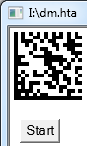
Barcode in HTML
This page shows how to use the ActiveX based version of StrokeScribe barcode generator to produce barcodes on HTML pages in IE and in Windows built-in tool called MSHTA.
How to Proceed
- Download and install the barcode generator;
- Create a .html file for running in IE or .hta file for running in MSHTA;
- Copy the sample code into your file.
- To run any ActiveX in IE, you'll need to enable active content execution.
The Code Example
You may customize the barcode properties from javascript or by using the <param> tags. The example shows both methods.
<html>
  <head>
    <script>
      function SetBarcode()
      {
        var barcode = document.getElementById("barcode");
        barcode.Text = "ABCDEF";
        barcode.Alphabet = 8;

	if(barcode.Error)
	{
	  alert(barcode.ErrorDescription);
	}
     }
    </script>
  </head>
  <body>
    <object classid="CLSID:7E42B8C5-73BE-4806-8904-FF4080A6960C" id="barcode"
        style="width: 20mm; height: 20mm; display:block; margin:10mm">
	<param name="Alphabet" value="25"/>
	<param name="Text" value="ABCD1234"/>
    </object>

    <button onclick="javascript:SetBarcode()">Test</button>
  </body>
</html>

You may control the barcode both by the attributes and from the code.
The Text= specifies a text you want to encode in the barcode.
The Alphabet=8 displays a Data Matrix barcode.
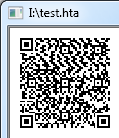
The Alphabet=25 displays a QR Code.
Additional Code Samples
Using UTF-8
This is useful when a barcode containing national characters needs to be readable by smartphones.
barcode.CodePage=65001;
barcode.Text = "123ABCdefабвгд";
Encoding a Byte Array
Use this code if you need to encode binary data in a barcode.
barcode.CodePage = -1;
z = new Array(0x00, 0x20, 0x80, 0xC0, 0xFF);
barcode.Text = z;
Code Snippets by Barcode Type
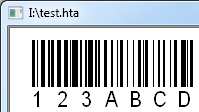
CODE 128
To create a CODE 128, modify the object attributes in the following way:
<html>
<body>
  <object classid="CLSID:7E42B8C5-73BE-4806-8904-FF4080A6960C" id="barcode"
    style="position: absolute; width: 50mm; height: 20mm; left: 2mm; top: 2mm;">
	<param name="Alphabet" value="5"/> <!-- 5 = CODE 128 -->
	<param name="Text" value="123ABCD"/>
  </object>
</body>
</html>
QR CODE
To create a QR Code, modify your code or object attributes in the following way:
<html>
<body>
  <object classid="CLSID:7E42B8C5-73BE-4806-8904-FF4080A6960C" id="barcode"
    style="position: absolute; width: 25mm; height: 25mm; left: 2mm; top: 2mm;">
	<param name="Alphabet" value="25"/> <!-- 25 = QR CODE -->
	<param name="Text" value="123ABCD"/>
        <!-- The below values are optional -->
	<param name="QrECL" value="3"/>    <!-- Non-default QR CODE error correction level -->
	<param name="QrMinVersion" value="8"/>  <!-- How to force minimum matrix size -->
	<param name="Rotation" value="90"/>
	<param name="CodePage" value="65001"/>   <!-- Switching to UTF-8 -->
  </object>
</body>
</html>
PDF417
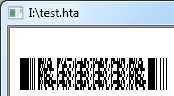
To create a PDF417 barcode, modify your code or object attributes in the following way:
<html>
<body>
  <object classid="CLSID:7E42B8C5-73BE-4806-8904-FF4080A6960C" id="barcode"
    style="position: absolute; width: 40mm; height: 20mm; left: 2mm; top: 2mm;">
	<param name="Alphabet" value="6"/> <!-- 6 = PDF417 -->
	<param name="Text" value="12ABC"/>
        <!-- The below values are optional -->
	<param name="PDF417Rows" value="10"/>   <!-- How to fix number of rows or columns in PDF417 -->
	<param name="PDF417Cols" value="4"/>
	<param name="PDF417ErrLevel" value="1"/>   <!-- Non-default error correction level -->
  </object>
</body>
</html>
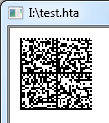
DATA MATRIX
To create a Data Matrix barcode, modify your code in the following way:
<html>
<body>
  <object classid="CLSID:7E42B8C5-73BE-4806-8904-FF4080A6960C" id="barcode"
    style="position: absolute; width: 20mm; height: 20mm; left: 2mm; top: 2mm;">
	<param name="Alphabet" value="8"/> <!-- 8 = DATA MATRIX -->
	<param name="Text" value="12ABC"/>
        <!-- The below values are optional -->
	<param name="DataMatrixMinSize" value="36"/>   <!-- To force the minimum matrix size -->
  </object>
</body>
</html>
ITF-14
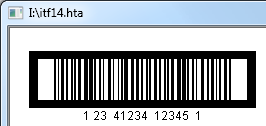
To create an ITF-14 barcode, modify your code in the following way:
<html>
<body>
  <object classid="CLSID:7E42B8C5-73BE-4806-8904-FF4080A6960C" id="barcode"
    style="position: absolute; width: 60mm; height: 20mm; left: 5mm; top: 5mm">
	<param name="Alphabet" value="7"/>    <!-- 7 = ITF-14 -->
	<param name="Text" value="1234123412345"/>
	<param name="ITF14BearerBox" value="1"/>
  </object>
</body>
</html>
EAN-13
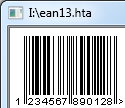
To create EAN-13 barcode, modify your code in the following way:
<html>
<body>
  <object classid="CLSID:7E42B8C5-73BE-4806-8904-FF4080A6960C" id="barcode"
    style="position: absolute; width: 60mm; height: 20mm; left: 5mm; top: 5mm">
	<param name="Alphabet" value="3"/>    <!-- 3 = EAN-13 -->
	<param name="Text" value="123456789012"/>
  </object>
</body>
</html>
You may specify a 12-digit or a 13-digit string. The barcode generator automatically calculates checksums for 12-digit EAN codes.
AZTEC
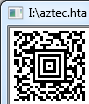
To create an AZTEC barcode, modify your code in the following way:
<html>
<body>
  <object classid="CLSID:7E42B8C5-73BE-4806-8904-FF4080A6960C" id="barcode"
    style="position: absolute; width: 20mm; height: 20mm; left: 5mm; top: 5mm">
	<param name="Alphabet" value="33"/>    <!-- 33 = AZTEC -->
	<param name="Text" value="123ABCD"/>
	<param name="AztecECL" value="40"/>  <!-- To manually set the desired error correction level -->
	<param name="AztecMinLayers" value="8"/>  <!-- To force minimum size of the AZTEC matrix -->
  </object>
</body>
</html>


© 2026 StrokeScribe. All rights reserved. Use of any portion of this site constitutes acceptance of our Terms of Use and Privacy Policy. The website material may not be reproduced, except with the prior written permission.